Ability Usage
Base Tensura reference Core Mechanics
At a glance
Tensura: Reincarnated comes with many different ways of utilizing abilities.
Tensura: Reincarnated comes with many different ways of utilizing abilities.
Learning
Before using an ability, you are required to learn it.

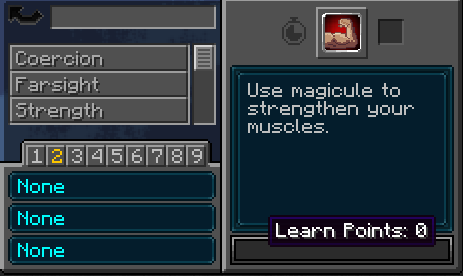
Unlearnt abilities will show up in grey text in your Ability Menu, and you can hover on the progress bar to see how many points you have. The learning process is straight-forward: equip the ability in any slot and activate it with the corresponding keybind.
A message will appear on the screen, saying that you've become closer to acquiring it.

Upon reaching 100 Learn Points, you will learn the ability and become able to use it. Its color in the Menu will also change depending on its type.

Once you have learnt a skill. It will reduce your Max MP by a certain amount depending on the type of skill:
- Common Skills cost 100 MP
- Extra Skills cost 1,000 MP
Also shown via Obtainment Cost on Every Skill's page
There is a 10% chance that you will fail during your attempt to learn the ability. In that case, the message will not appear. Instead, you will lose between 1 to 3 points and be given a random effect between Blindness, Paralysis, and Insanity.
While straight-forward, the process can be rather tedious and time-consuming, especially if you fail often and because you have to remember to use the ability when it's off cooldown. Some of the abilities can make it faster and easier, namely: Sage, Great Sage, Mathematician, and Cook. The boosts are stacked, meaning having multiple of these will yield more points than having one.
Mastery
Certain ability modes and uses might require mastery.
Mastery is a mechanic that is present in every ability, but it's not always a requirement. Some abilities have multiple modes or uses that become available only after fully mastering the said ability. Similarly to Learning, you gain it by using the ability, however, unlike with learning, there is no chance of failing, and the number of points required to master it is usually higher in return.
Much like learning, it also has abilities that speed up the process: Sage, Great Sage, Mathematician, Fighter, and Cook. The boosts are stacked here as well.
Players will also gain x2 mastery points when their ability move hits a target (Making it x3 points for each activation, counting the one for pressing the ability button). If the move kills an entity, players will gain another x2 mastery points (making it x5 for the activation).
Presets
It is possible to use 27 skills at once through the use of the 9 presets.
By default, you can switch presets with Alt + Scroll Wheel and Alt + Preset Number Keybind. Alternatively, you can switch presets through the Ability Menu by double clicking the preset number.
A preset can have up to 3 abilities equipped at a time, and those can be a combination of Skills, Magics, and Battlewills.
Interacting with the slots is as follows:
- Left Clicking after selecting a learnt ability will equip it in the clicked slot.
- Right Clicking a slot that contains an ability will select it and show that ability's information.
- Middle Clicking (Mouse Wheel) will remove the ability contained in the slot.
Search filters
Instead of typing the name of the skill in the search bar, you can type the following:
| Filter | Filter Description |
|---|---|
| f:learned | Shows all learned skills |
| f:learning | Shows all skills that have yet to be learned |
| f:temporary | Shows all temporary skills |
| f:toggleable | Shows all toggle able skills |
| f:toggledon | Shows all skills that are toggled ON |
| f:toggledoff | Shows all skills that are toggled OFF |
| f:oncooldown | Shows all skills that are ON cooldown |
| f:offcooldown | Shows all skills that are OFF cooldown |
| f:active | Shows all active skills |
| f:passive | Shows all passive skills |
| f:mastered | Shows all mastered skills |
| f:unmastered | Shows all NON mastered skills |
Ability Modes
Many abilities have more than one usage.
By default, the keybind to switch ability modes is Alt + Skill Slot Key. For example, if Predator was in the third slot, you would press Alt + C.
Some modes require the ability to be mastered. For this, refer to the Mastery section.
Ability Activation Types
Abilities have different ways of using them.
This section describes the terms used on the wiki. They are not explicitly mentioned in the mod.
- Active - Press: implies the ability has to be pressed to use it.
- Active - Hold: implies the ability has to be pressed and held to use it.
- Passive - In Slot: implies the ability cannot be activated manually, but instead has to be equipped in a active slot to be activated.
- Passive - Toggle: implies the ability has to be toggled on in the Ability Menu, which can be done through the checkbox next to the ability's icon.
- True Passive: implies the ability is always activated and cannot be turned off.




Source and licensing
Base Tensura reference adapted from Mechanics/Ability Usage on the Tensura: Reincarnated Wiki (revision 13371, modified 2026-08-20T11:28:50Z). Adapted text is available under CC BY-SA 4.0.
Media credits (3 source files)
- SkillLearning.png — CC BY-SA 4.0; uploaded by Zykestheone; revision 3115
- StartLearning.png — CC BY-SA 4.0; uploaded by Zykestheone; revision 3116
- SkillLearnt.png — CC BY-SA 4.0; uploaded by Zykestheone; revision 3118